Tutorial 1 requires some knowledge of Fireworks. If you aren’t comfortable with Fireworks, please work through the tutorials here.
Basic Tutorial - 5-10 min
In the quickstart, we use auto_setup to put a Python function in a Firework and create an optimization loop, then launch it, run it, and examine the results. If evaluating your objective function is more complex, it is useful to put it in a FireWorks workflow, where individual parts of the expensive workflow can be handled more precisely. In this tutorial, we’ll walk through setting up an optimization loop if you already have a workflow that evaluates your objective function.
This tutorial can be found in rocketsled/examples/basic.py.
Overview
What’s the minimum I need to run a workflow?
Rocketsled is designed to be a “plug and play” framework, meaning “plug in” your workflow and search space. The requirements are:
Workflow creator function: takes in a vector of workflow input parameters
xand returns a Fireworks workflow based on those parameters, including optimization. Specified with thewf_creatorarg to OptTask. OptTask should be located somewhere in the workflow thatwf_creatorreturns.‘_x’ and ‘_y’ fields in spec: the parameters the workflow is run with and the output metric, in the spec of the Firework containing
OptTask. x must be a vector (list), and y can be a vector (list) or scalar (float).Dimensions of the search space: A list of the spaces dimensions, where each dimension is defined by
(higher, lower)form (for float/ int) or [“a”, “comprehensive”, “list”] form for categories. Specified with thedimensionsargument to OptTaskMongoDB collection to store data: Each optimization problem should have its own collection. Specify with
host,port, andnamearguments to OptTask, or with a Launchpad object (vialpadarg to OptTask).
Making a Workflow Function
The easiest way to get started with rocketsled using your own workflows is to modify one of the examples.
We are going to use a workflow containing one Firework and two tasks - a task that takes the sum of the input vector, and OptTask. Let’s create a workflow creator function, the most important part. This function takes an input vector, and returns a workflow based on that vector.
from fireworks.core.rocket_launcher import rapidfire
from fireworks import Workflow, Firework, LaunchPad
from rocketsled import OptTask
from rocketsled.examples.tasks import SumTask

# a workflow creator function which takes x and returns a workflow based on x
def wf_creator(x):

    spec = {'_x':x}
    X_dim = [(1, 5), (1, 5), (1, 5)]

    # SumTask writes _y field to the spec internally.

    firework1 = Firework([SumTask(),
                          OptTask(wf_creator='rocketsled.examples.basic.wf_creator',
                                  dimensions=X_dim,
                                  host='localhost',
                                  port=27017,
                                  name='rsled')],
                          spec=spec)
    return Workflow([firework1])
We define the info OptTask needs by passing it keyword arguments.
The required arguments are:
wf_creator: The full path to the workflow creator function. Can also be specified in non-module form, e.g.,
/my/path/to/module.pydimensions: The dimensions of your search space
The remaining arguments define where we want to store the optimization data. The default optimization collection is opt_default; you can change it with the opt_label argument to OptTask.
By default, OptTask minimizes your objective function.
Launch!
To start the optimization, we run the code below, and we use the point [5, 5, 2] as our initial guess.
def run_workflows():
    TESTDB_NAME = 'rsled'
    launchpad = LaunchPad(name=TESTDB_NAME)
    # launchpad.reset(password=None, require_password=False)
    launchpad.add_wf(wf_creator([5, 5, 2]))
    rapidfire(launchpad, nlaunches=10, sleep_time=0)

if __name__ == "__main__":
    run_workflows()
Visualize Results
from fireworks import LaunchPad
from rocketsled import visualize

lpad = LaunchPad(host='localhost', port=27017, name='rsled')
visualize(lpad.db.opt_default)
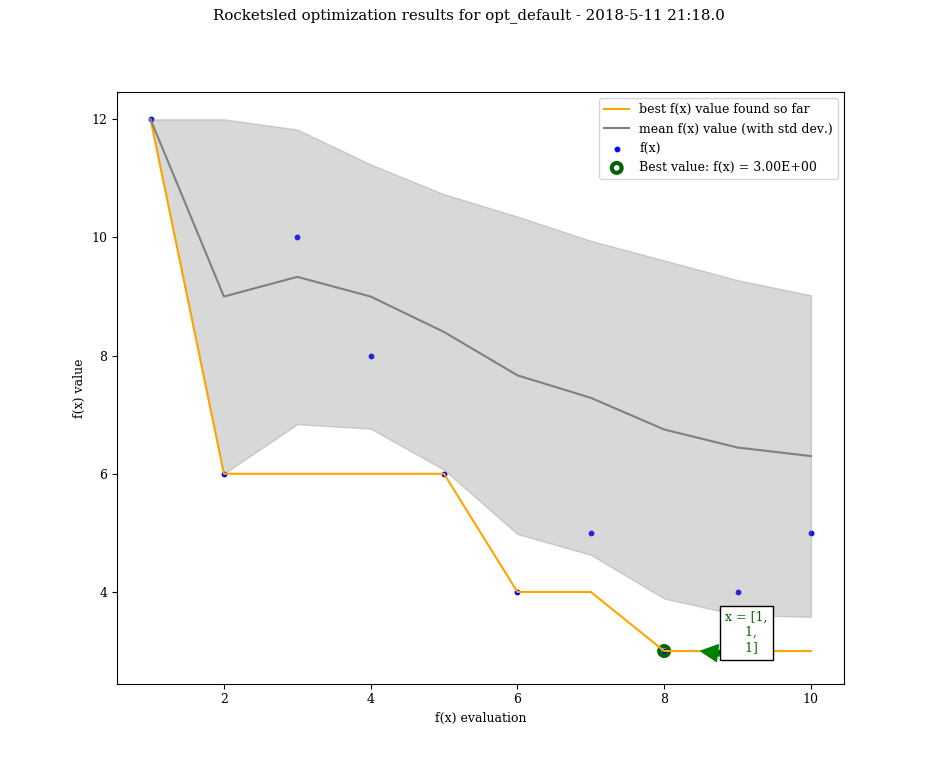
Great! We just ran 10 optimization loops using the default optimization procedure, minimizing our objective function workflow (just SumTask() in this case).
See the guide to see the full capabilities of OptTask, the advanced tutorial, or the examples in the /examples directory.